Payment route · Exchange-issued card
Pay for ChatGPT Plus with a Gate Card: from sign-up to the first charge
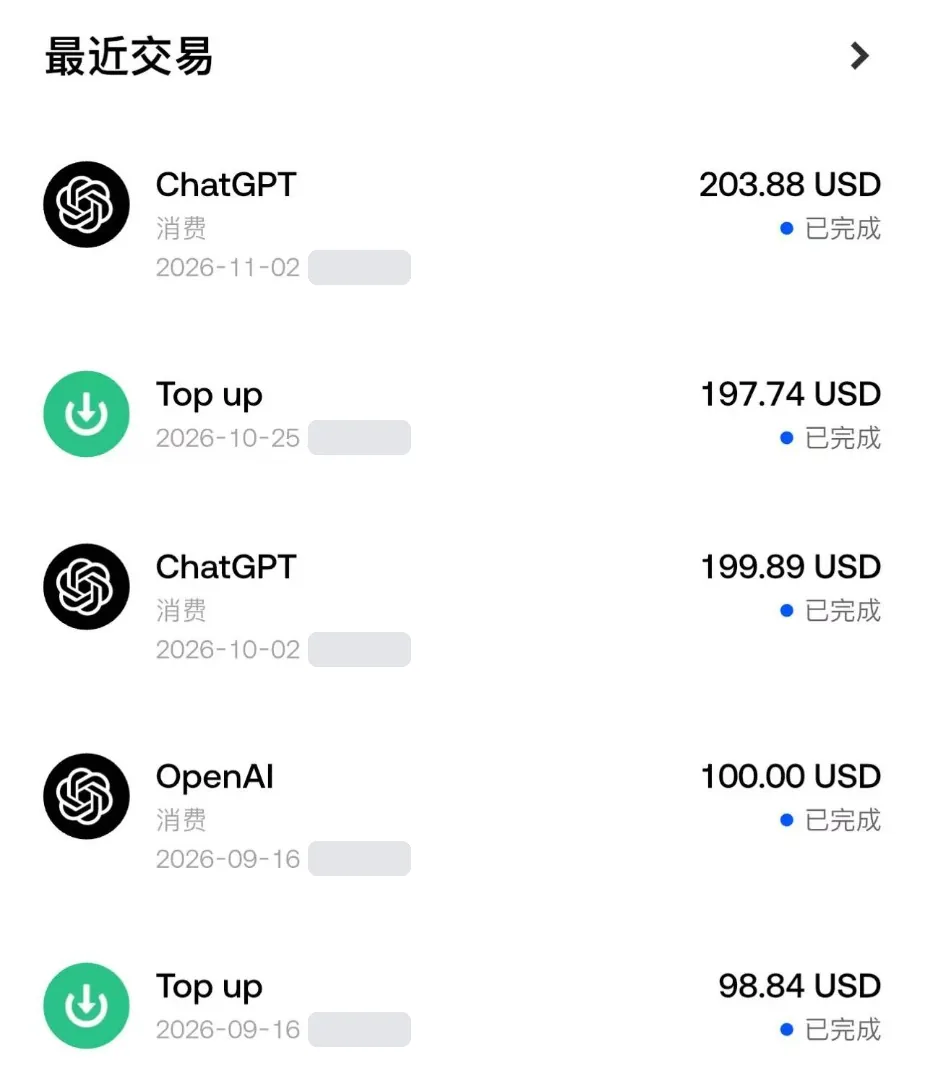
When your local card bounces at ChatGPT checkout, the usual fix is a US-dollar card. This guide covers one route: open an account on the Gate exchange, get its virtual card (Gate Card), load it with USDT, and pay for ChatGPT Plus with it. We pay for our own ChatGPT subscription this way: the October and November 2026 charges, about $200 each, both completed (our plan costs more than Plus; the checkout is the same). The transaction list is in step 5. The steps, fees and limits below were checked against Gate's own help pages. Read the first section before anything else: a long list of countries can't get this card.
Card fees, cashback tiers and everything else the card can pay for are covered in Gate Card: how to apply and what you can use it for; this guide sticks to paying for ChatGPT Plus.
- If you're eligible, the whole route takes thirty minutes to an hour. Most of that is the ID check; the virtual card works as soon as it's approved.
- On a $20 Plus month, the card side adds a 0.9% top-up or conversion fee, about $0.18, as long as ChatGPT bills you in US dollars.
- The AI Card also pays cashback: 1% from day one, and once you spend $500 on the card in a month, 50% back on your first AI subscription each following month, up to 10 USDT. That brings Plus to about $10 a month.
- Residents of mainland China, Hong Kong, the US, the UK, Indonesia, Pakistan, India and a few dozen other places can't use it. Gate lists them as restricted locations. Full list below.
- No card is guaranteed to pass. OpenAI runs its own fraud checks. What we can tell you is that it works for us, and what to check when it doesn't.
Can you get the card?
This decides whether the rest of the guide is worth your time. Two doors have to open: Gate has to be willing to open an account and issue you a card, and OpenAI has to offer ChatGPT where you live.
Gate's door. Section 2.5 of the Gate user agreement lists "Restricted Locations" where it doesn't provide services. When we checked in November 2026, the list included:
| Region | Countries and territories Gate lists as restricted |
|---|---|
| Asia | Mainland China, Hong Kong, Singapore, Malaysia, India, Indonesia, Japan, South Korea, Thailand, Cambodia, Myanmar, Vietnam, the Philippines, Pakistan, the UAE, Uzbekistan |
| Europe | UK, France, Germany, Spain, the Netherlands, Austria, Malta, Russia, and the Crimea, Luhansk and Donetsk regions |
| Americas | USA, Canada, Argentina, Venezuela, Cuba |
| Other | Iran, Sudan, North Korea |
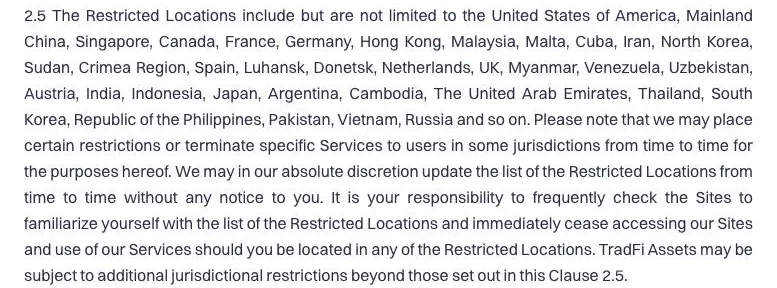
The list says "include but are not limited to", and Gate can change it without notice. Not being on it doesn't mean you're in. The real answer is whether the card application page still offers you a card after you pick your country of residence.
A few cases worth spelling out:
- You live in the US. Gate's main platform doesn't serve the US. Gate US has a separate prepaid Visa, available only in some states, with its own rules. This guide doesn't cover it.
- You live in the European Economic Area. From 30 June 2026 Gate moved EEA users to a separate EU platform with a euro-denominated card. This guide is about the global platform's US-dollar card.
- You live in Türkiye or Brazil. Both have specific rules on paying with crypto assets. Türkiye's central bank bars using crypto assets directly or indirectly for payments; Brazil's central bank treats cross-border crypto card settlement as foreign-exchange business. Read our Türkiye and Brazil pages before choosing this route.
- You're thinking of picking a different country to get around the list. Don't. It breaks both Gate's and OpenAI's terms, and an account opened that way can be frozen with your money in it. We don't cover workarounds.
OpenAI's door. ChatGPT is only offered in the countries on OpenAI's supported countries page. OpenAI's help pages on declined payments say both you and your card issuer need to be in a supported region.
What to have ready
- You must be 18 or older. It's one of the account conditions in Gate's user agreement.
- One valid ID of your own: passport, national ID card or driving licence. When you apply for the card you must use the same document you verified with.
- A phone number and email that can receive codes. Both need to be linked before you apply for the card.
- Possibly proof of address. Gate's card page says some card types need one issued within the last three months, such as a utility bill or bank statement. Don't chase it until the application asks.
- $20–30 worth of USDT, or a way to buy USDT on Gate. How you get from your local currency to USDT varies a lot by country; see your country on our country routes page.
Step 1: open a Gate account
Following Gate's web sign-up guide: click Register at the top right, pick your country or region of residence and tick the user agreement, choose email or phone, enter the code, set a password, and confirm. In the app the Sign up button is at the top left; the steps are the same.
Pick your real country of residence. ID checks, which cards you're offered and whether you can get one at all all follow from it. Pick wrong and your ID won't match at the verification step, and you'll be starting over.
Once the account exists, link your email, phone and an authenticator app straight away. You'll need two-factor confirmation later to view the card number and approve 3-D Secure checks.
Step 2: verify your identity
Gate Card requires Level 2 identity verification, as stated on Gate's card page. On the web, go to your avatar at the top right → Identification → Verify Now.
Gate's verification guide asks for an ID (passport, national ID or driving licence) plus a face scan; if the face scan won't work, you can submit a hand-gesture photo instead. Review is usually automatic within minutes and can take up to one business day. The accepted documents depend on the country you picked, so go by what the page shows you.
- Check your name and ID number before submitting. Gate requires the card application to use the same document as your global-platform verification, or it will be rejected.
- Don't resubmit while it says "under review". It just sends you to the back of the queue.
Step 3: apply for the virtual card
On the web: Buy Crypto → Gate Card at the top, or Products → Card in the footer, then Apply Now. In the Gate Pay app it's the Card tab at the bottom. The application checks your email, phone and ID in turn, then walks you through a short form. Per Gate's help page, the virtual card activates automatically once approved.
Which cards you see depends on where you live. Gate's help centre currently lists Graphite & Silver, Orange, Blue and AI, and Gold; go by what your application page shows. For paying ChatGPT, these are the three to compare:
| AI Card / Blue Card | Orange Card | |
|---|---|---|
| Virtual card fee | Free for a limited time | Free |
| On opening | 10 USDT first top-up, no top-up fee; becomes your card balance if approved, refunded if not | No first top-up stated |
| FX fee on non-USD charges | AI 1.5%, Blue 1.7% | 1.0% |
| AI subscription cashback | AI Card only, tier T1 and above | None |
| Source | Blue/AI fee page (20 Jul 2026) | Orange fee page (23 Apr 2026) |
For ChatGPT, pick the AI Card. AI subscription cashback is AI Card only; the Blue Card doesn't get it, and the AI Card's FX fee (1.5%) is also lower than Blue's (1.7%). The 10 USDT first top-up is money you'd be loading anyway. How the cashback works and what it saves you is in its own section below. If your application page only offers the Orange Card, it pays ChatGPT fine; you just don't get the AI subscription cashback.
Your card number, expiry and CVV are under View Details on the web, or in the Gate Pay app under Card → Manage → Card Details. According to Gate, you'll need to pass two-factor verification to see them.
Step 4: load it, and how much
Gate cards take money in one of two ways, depending on the card type:
- Prepaid: you top the card up with USDT and purchases come out of the card balance. The AI and Blue cards work this way: tap Top Up on the card page, pick the coin and amount, and pay a 0.9% top-up fee, shown live on the page.
- Instant Spend: nothing sits on the card; each purchase is paid from USDT, USDC, BTC or ETH in your Gate account at the moment you pay. Per Gate, you choose on the Gate Card page whether it draws from your payment account, spot account or flexible earn, and which coin.
How much: Plus is $20 a month, plus tax in some countries. For the first month, have 25–30 USDT on the card or in the paying account to cover tax, fees and rounding. With the AI or Blue Card, the 10 USDT first top-up is already there, so add another 15–20.
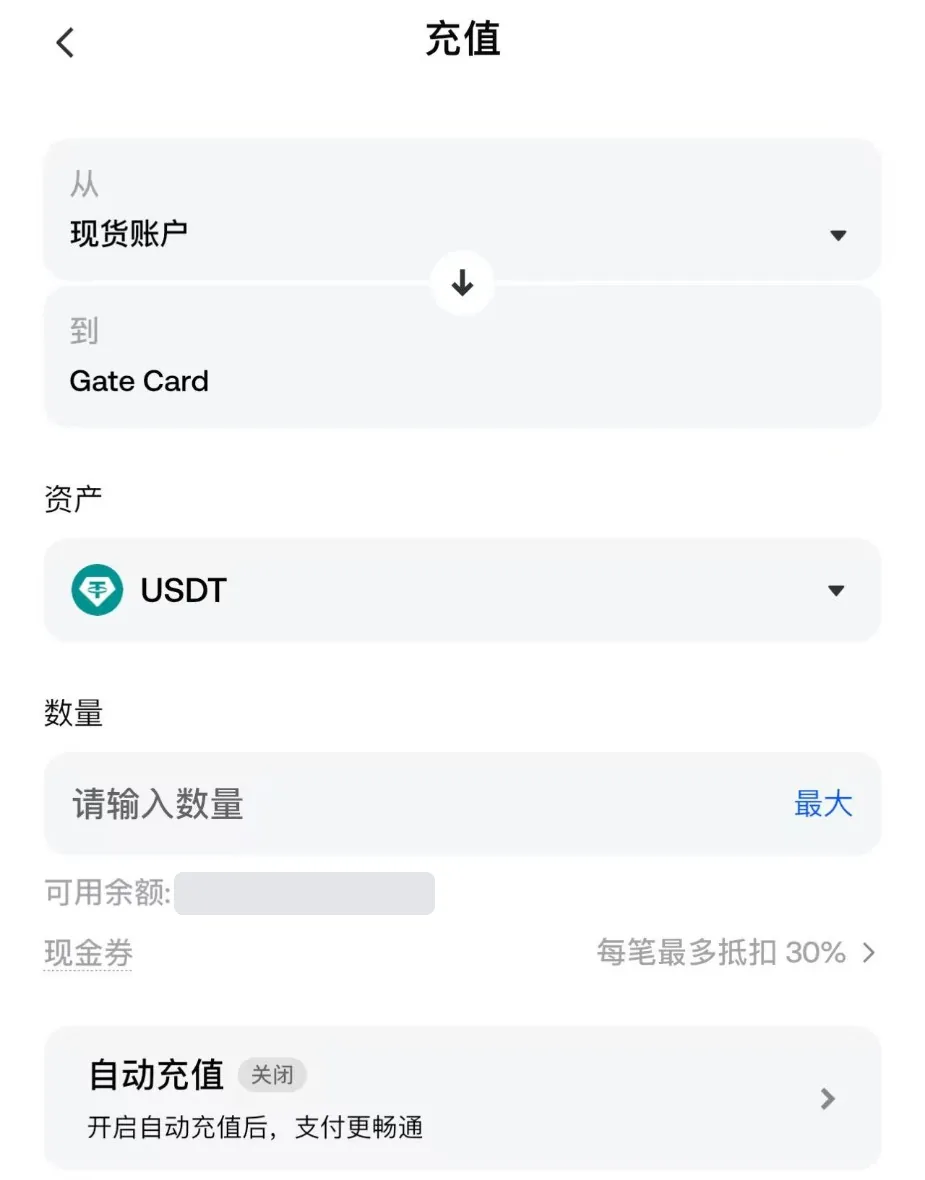
Turn on auto top-up. The app's top-up screen has an Auto top-up switch, off by default, which the app says makes payments smoother. For a subscription it's worth turning on so a renewal doesn't fail on a low balance; check the in-app details for when it triggers and how much it adds.
Don't pay from BTC or ETH. In Instant Spend mode that means selling a little crypto every time your subscription renews, at whatever the price is that day. For a subscription, set the paying coin to USDT and keep only USDT there.
Step 5: add the card in ChatGPT
Subscribe on the web
Open chatgpt.com in a desktop browser, click your profile at the bottom left → Upgrade plan → Plus. Subscribing inside the iPhone or Android app goes through the App Store or Google Play, not your card.
Check the checkout currency
If checkout shows USD, Gate charges no FX fee. If it shows your local currency, you'll pay an FX fee on top: 1.5% on the AI Card, 1.7% on Blue, 1.0% on Orange.
Enter number, expiry and CVV
Copy them from the card details in Gate rather than typing by hand. Use the name on your verified ID for the cardholder name.
Use your real address for billing
Gate doesn't publish a billing-address requirement for the card. If your card details show an address, use that. If not, use the residential address you verified with and select the country you actually live in. Ignore advice to enter a US tax-free-state address: a mismatched address makes a decline more likely, not less.
Approve any check in Gate
First, large or risk-flagged payments may ask you to approve them on the Gate website or in the Gate Pay app. If your browser blocks the pop-up, allow it and try again.
Confirm the charge
Once Plus is active, check the card's transaction list in Gate and make sure the OpenAI charge shows as completed. Leave enough on the card for next month.
What it really costs each month
Example: AI or Blue Card, ChatGPT billing $20 in US dollars, before tax.
| Item | Amount | Notes |
|---|---|---|
| ChatGPT Plus | $20.00 | Tax added in some countries; checkout shows the final amount |
| Top-up fee, 0.9% | about $0.18 | In Instant Spend mode it's a 0.9% conversion fee instead, about the same |
| FX fee | $0 | None on USD checkout; 1.0–1.7% if billed in local currency |
| Monthly / card fee | $0 | Virtual card; AI/Blue issuance is "free for a limited time" |
| Total | about $20.18 | Excludes the cost of buying USDT with your local currency |
That's before cashback. With the AI Card you get some of it back; see the next section.
Getting from your local currency into USDT often costs more than the 0.9% on the card side, and it varies by country and channel. Your country page covers that leg.
Fees for when things go wrong (Blue/AI cards): $1 per reversal, 2% of the amount on refunds, and $35 for a chargeback. If ChatGPT charges you wrongly, ask OpenAI for a refund first rather than opening a chargeback.
AI Card cashback: what Plus really costs
The AI Card pays cashback in two layers. The rules come from Gate's tier rules (28 Feb 2026) and AI Card benefits page (2 Nov 2026). In November 2026 we compared them with the Rewards screen in our own app, and they match.
| Everyday spending cashback | AI subscription cashback | |
|---|---|---|
| Who gets it | Every tier, from T0 | AI Card only, T1 and above |
| How much | 1% at T0 and T1; capped at 5 USDT a month at T0, 50 USDT at T1 | 50% of your first eligible AI subscription each calendar month, up to 10 USDT |
| Paid as | Points, redeemed in the app's points market | A cash voucher, usable only for Gate Card spending or to offset top-ups; can't be withdrawn or transferred |
| Which merchants | Most purchases; financial services, prepaid cards and currency exchange don't earn it | ChatGPT / OpenAI, Claude, Gemini, Cursor, Perplexity |
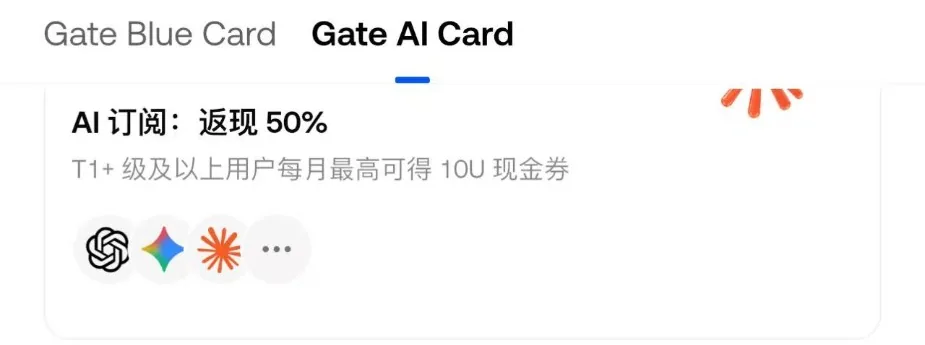
How to reach T1: spend $500 or more on the card in a calendar month and you move to T1 the next month. Gate VIP 5+ users start at T1, but new accounts are normally VIP 0. The Rewards screen in the app shows how far you have to go, for example "spend 296.12 USD more to reach T1 next month". The tier is recalculated every month from the previous month's spending, so keeping the 50% means spending $500 every month.
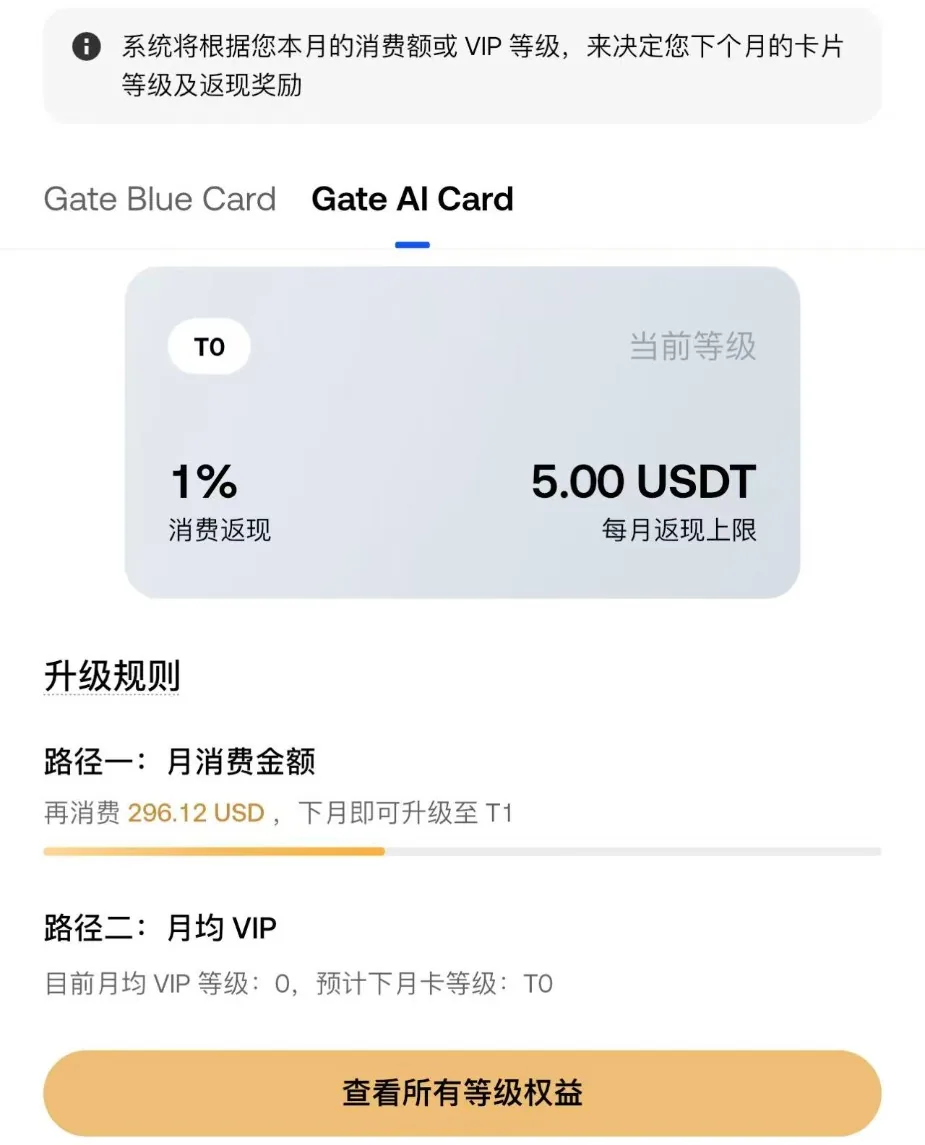
One month of Plus, two ways:
| Your situation | Tier this month | Paid for Plus | Back | Real cost |
|---|---|---|---|---|
| The card only pays for Plus | T0 | about $20.18 | 1% spending cashback, about $0.20, in points | about $20 |
| You spent $500+ on the card last month | T1 | about $20.18 | 10 USDT cash voucher (50%, capped at 10) | about $10 |
Put simply: if the card only pays for Plus, the cashback roughly cancels the top-up fee. If your online shopping, subscriptions and travel go on the card and add up to $500 a month, Plus is effectively half price. For what else the card can be used for, see Gate Card: how to apply and what you can use it for. Gate doesn't say whether the same AI subscription earns both the 1% points and the 50% voucher, so we haven't counted both.
Two ways to miss the cashback:
- Subscribe on the web with the card itself. If you subscribe in the ChatGPT iPhone or Android app, Apple or Google is the merchant, and Gate excludes purchases made through third-party payment services.
- Only the first eligible AI subscription each month counts. If you pay for ChatGPT and Claude in the same month, only whichever is charged first earns it. Declined, reversed or refunded transactions don't count.
Renewals, switching cards, cancelling
Plus renews from the card every month. A few points from Gate's subscription payment page:
- If the balance is short or the card isn't in good standing, the renewal fails, and the merchant may retry several times over the next days. Each retry counts as a decline.
- Freezing the card or emptying it is not the same as cancelling. To stop Plus, cancel in ChatGPT's settings. If you only freeze the card, OpenAI keeps trying to charge it.
- To switch cards (say, Orange to AI Card), update the payment method in ChatGPT's subscription settings first, then deal with the old card.
If the charge is declined
Go in this order; the first items are the most common:
- Balance. Prepaid cards: the card balance. Instant Spend: the chosen account and coin. Leave room for tax and fees.
- 3-D Secure. Did you miss an approval prompt in Gate? Did the browser block the pop-up?
- Is there a record in Gate? A declined transaction in the card history usually carries a reason, such as insufficient balance or a risk-control block. No record at all means the request never reached Gate and was stopped on OpenAI's side, so focus on the next two items.
- Billing address and name. Compare them with the card details and your verified ID.
- Where you're connecting from. The location you use ChatGPT from, the billing address country and your Gate residence should line up.
Still failing? Wait 24 hours and try once more. If it still won't go, see our general declined-at-checkout checklist, or use another route for now, such as subscribing through your phone's app store.
Risks and scams
- Money on an exchange carries exchange risk. Keep only a month or two of subscription money on the card and in your Gate account. It's not a place to store savings.
- USDT isn't a dollar deposit. It has briefly lost its peg before, and platforms can freeze accounts for compliance reasons. Hold it briefly, only what you need.
- Download Gate and Gate Pay only from the official site and app stores. Anyone on Telegram, WhatsApp or WeChat claiming to be Gate support and asking for codes or transfers is a scammer.
- Avoid "we'll open a Gate card for you" and rented verified accounts. A card under someone else's identity can be emptied or frozen at any time.
- This isn't investment advice. We're not suggesting you buy or trade crypto. USDT is only a bridge to pay the bill.
FAQ
Does a Gate Card really work for ChatGPT Plus?
Can I add the referral code after I've applied?
Does the AI Card give cashback on Plus?
Can I use a Gate Card to buy OpenAI API credits?
Can I just freeze the card to stop paying?
Category: ChatGPT and OpenAI